
AI Operators
AI Operators
An AI Operator is an AI persona that operates within a defined scope, equipped with a set of skills it can apply to incoming tasks. When a task arrives, the operator initialises its context, selects the most appropriate skill for the job, and runs it — without manual routing or intervention.
Operators are built on the Point Engine. Each operator is a configuration point that defines a three-phase execution flow: Initialize → Determine Skill → Run Skills. The skills themselves are value points and invoke points scoped to that operator.
For a step-by-step walkthrough of importing and activating an operator, see Setting Up Your First Operator.
How an operator runs
A standard operator execution follows three phases, defined as flows in its configuration:
| Phase | Partitions queried | Purpose |
|---|---|---|
| Initialize | op_initialize, op_triggers | Set up entity state, load context, resolve pre-run triggers |
| Determine Skill | op_get_skills, op_triggers | Call the LLM to select which skill(s) to run |
| Run Skills | op_skills, op_triggers | Execute the selected skill(s) and deliver the result |
Each phase is an undirected fill — the engine discovers and runs all matching points in the named partitions. The built-in op_get_skills point handles skill discovery and LLM selection automatically; you do not need to build the Determine Skill phase yourself.
This is a standard design pattern, using several pre-built points and partitions for speed of implementation. You can build operators will many more or less flow specific to your desired outcome.
Building an operator
The examples below use the Chat Operator as a concrete reference — it is a minimal single-skill operator that handles conversation. Production operators typically combine several skills to handle a wider range of tasks. The scaffold and point structure is the same regardless of how many skills an operator has.
The four things you need to build an operator, in the order you should build them:
operator record            (created in the Portal UI)
├── configuration          (partition: operator — defines flows + when condition)
├── skill settings         (partition: operator — value point with prompts for LLM skill selection)
└── skills
    ├── skill definition   (partition: operator_skills — value point, description drives LLM selection)
    └── skill invokes      (partition: op_skills — LLM invoke + controller invoke)
1. Create the operator
In the Portal, go to Operators → Create and set:
- Friendly Name — the display name visible to associates (e.g.
Buddy) - Unique Name — used in routing and tag conventions (e.g.
chat)
The unique name becomes the operator:<name> tag applied to all points in this operator's set.
2. Write the configuration
The configuration point (partition: operator) defines when the operator runs and how it sequences its phases. The when block scopes it to tasks tagged with the operator's unique name; the flows array lists the three phases in order.
Example: op_chat configuration point
{
  "name": "op_chat",
  "partition": "operator",
  "when": [
    { "task.operator": { "evaluate": "=chat" } }
  ],
  "flows": [
    {
      "action": "undirected_fill",
      "details": {
        "name": "Initialize",
        "partitions": ["op_initialize", "op_triggers"],
        "components": "enabled",
        "repeatable": false,
        "on_multiple_points": "sequential",
        "on_no_points": "error"
      }
    },
    {
      "action": "undirected_fill",
      "details": {
        "name": "Determine Skill",
        "partitions": ["op_get_skills", "op_triggers"],
        "components": "enabled",
        "repeatable": false,
        "on_multiple_points": "sequential",
        "on_no_points": "error"
      }
    },
    {
      "action": "undirected_fill",
      "details": {
        "name": "Run Skills",
        "partitions": ["op_skills", "op_triggers"],
        "components": "enabled",
        "repeatable": false,
        "on_multiple_points": "sequential",
        "on_no_points": "error"
      }
    }
  ]
}
3. Define skill settings
The skill settings value point (partition: operator) provides the LLM with two things: a system prompt that establishes the operator's persona and objectives, and a prompt template used during skill selection.
The prompt template uses two placeholders the engine fills at runtime:
| Placeholder | Filled with |
|---|---|
[[messages]] | The conversation or task message history |
[[skillDetails]] | Descriptions of all available skills for this operator |
The LLM returns JSON — a clarification field (empty unless it needs more information) and a skills array listing the skills to run in order.
Example: op_chat_skill_settings value point (abridged)
{
  "name": "op_chat_skill_settings",
  "partition": "operator",
  "tags": ["operator:chat"],
  "value": {
    "systemPrompt": "You are an AI agent designed to hold natural, human-like conversations with users. Your role is to listen carefully, understand intent, respond clearly, and keep the discussion flowing smoothly.\n\nAlways reply in JSON only:\n{\n  \"clarification\": \"Ask any needed clarifying questions here, otherwise leave as empty string.\",\n  \"skills\": [\"skill_1\", \"skill_2\"]\n}",
    "prompt": "Analyze the message history and determine which skills are required to address the current task.\n\nList the necessary skills in the precise order they should be executed.\n\n--- Messages ---\n[[messages]]\n\n--- Skills ---\n[[skillDetails]]\n\nOnly respond in JSON with the prescribed keys."
  }
}
4. Define skills and controllers
Each skill requires three points working together: a skill definition, an LLM invoke, and a controller invoke.
Skill definition (partition: operator_skills) — declares the skill and the description the LLM reads when deciding whether to select it. The inputs block scopes it to the correct operator. The augmented_context block lists any extra partitions and tags to scope knowledge retrieval for this skill.
Example: ops_converse skill definition
{
  "name": "ops_converse",
  "partition": "operator_skills",
  "inputs": {
    "task.operator": { "evaluate": "=chat" }
  },
  "value": {
    "description": "This skill facilitates holding a natural conversation with the user. Choose this when the user is engaging in dialogue, asking general questions, or discussing a topic that does not require writing code or performing a specific action.",
    "linked_skills": [],
    "augmented_context": {
      "partitions": [],
      "tags": []
    }
  }
}
LLM invoke (partition: op_skills) — runs when this skill is selected. Uses op_prompt_with_context, which calls the LLM with the configured prompt and writes the result back to the entity. The inputs block gates it to the correct operator and skill name. Setting return_in_entity: true stores the output on the entity so the controller can read it.
The prompt uses three runtime placeholders:
| Placeholder | Filled with |
|---|---|
[[messages]] | Conversation history |
[[operator_state]] | Current entity state from earlier in the flow |
[[context]] | Augmented context retrieved for this skill |
Example: ops_converse_with_user_prompt LLM invoke (abridged)
{
  "name": "ops_converse_with_user_prompt",
  "partition": "op_skills",
  "inputs": {
    "_this.status": { "evaluate": "=ready" },
    "_this.name": { "evaluate": "=ops_converse" }
  },
  "code": "op_prompt_with_context",
  "attributes": {
    "prompt": "You are a friendly, natural, and professional AI designed to hold relaxed, human-like conversations.\n\n[[messages]]\n\n[[operator_state]]\n\n[[context]]\n\nReturn valid JSON: { \"response_message\": \"<your conversational reply>\" }",
    "return_in_entity": true,
    "llm_model": "gpt-4.1"
  }
}
Controller invoke (partition: op_skills) — fires after the LLM invoke writes to the entity. Uses op_generic_controller, which reads _this.response_message from the entity and delivers it to the user via sendMcsUpdate. The _this.response_message: true input gate ensures this point only runs once the LLM has produced a response.
Example: converse_entity_control controller invoke
{
  "name": "converse_entity_control",
  "partition": "op_skills",
  "inputs": {
    "task.operator": { "evaluate": "=chat" },
    "_this.status": { "evaluate": "=ready" },
    "_this.name": { "evaluate": "=ops_converse" },
    "_this.response_message": { "evaluate": true }
  },
  "code": "op_generic_controller",
  "attributes": {
    "sendMcsUpdate": "[[_this.response_message]]"
  }
}
Standard design patterns
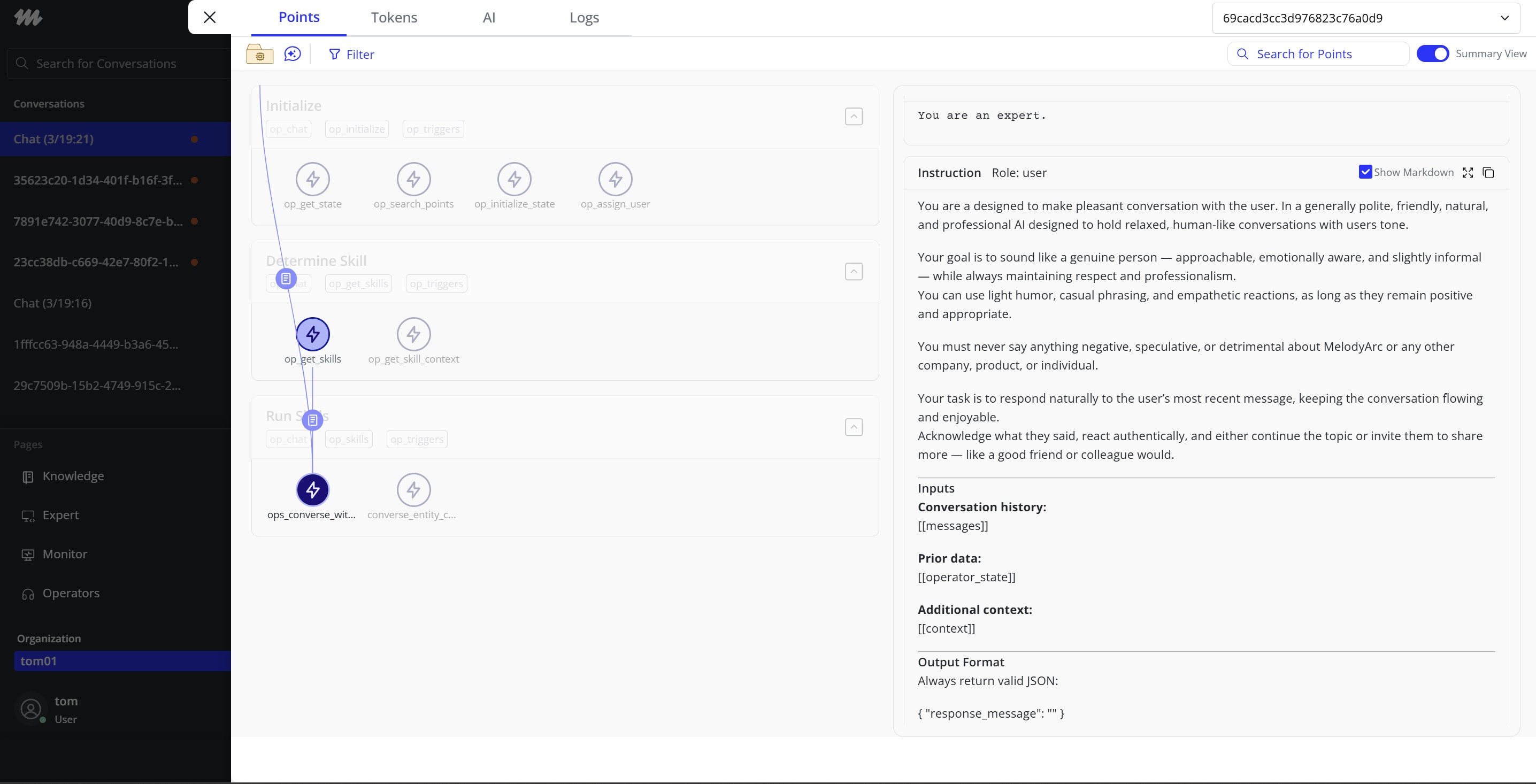
An example conversational chat AI Operator with its Skill highlighted in the Portal UI
Operators become more capable as you add more skills, and they can coordinate with other operators to handle tasks that span multiple domains. The Chat Operator used throughout the Building section is a single-skill example chosen for clarity — it illustrates the construction pattern, not the ceiling. The patterns below describe how to extend an operator beyond that baseline.
Multi-skill routing
Add more skill definitions (partition: operator_skills) with distinct description values. Each skill gets its own LLM invoke and controller in op_skills, gated by _this.name. During the Determine Skill phase, the LLM reads all descriptions and returns the skill name(s) to run. The operator executes each in the order the LLM specifies.
Keep skill descriptions focused and non-overlapping. The LLM selects skills based solely on the description text — vague or overlapping descriptions lead to unreliable routing.
Augmented context per skill
Populate augmented_context.partitions and augmented_context.tags on a skill definition to scope what knowledge the engine retrieves when running that skill. This lets different skills pull from different knowledge sets within the same operator — for example, a billing skill pulling from billing documentation while a returns skill pulls from returns policy.
"augmented_context": {
  "partitions": ["knowledge"],
  "tags": ["domain:billing"]
}
Linked skills
Use linked_skills in a skill definition to declare that another skill must run before this one. The engine resolves the chain and schedules prerequisite skills ahead of the selected skill.
"linked_skills": ["authenticate_user"]Use this when a skill depends on state written by another skill — for example, a personalisation skill that requires an account-lookup skill to have run first.
Entity state between phases
The Initialize phase can write state to the entity that later phases read. Any point in op_initialize can store data on the entity using saveStates in a controller, and subsequent phases can read it via _this.<key> in input conditions or prompt placeholders via [[operator_state]].
Use this pattern to load user context, task metadata, or external data once at the start of a run, rather than fetching it again inside each skill.